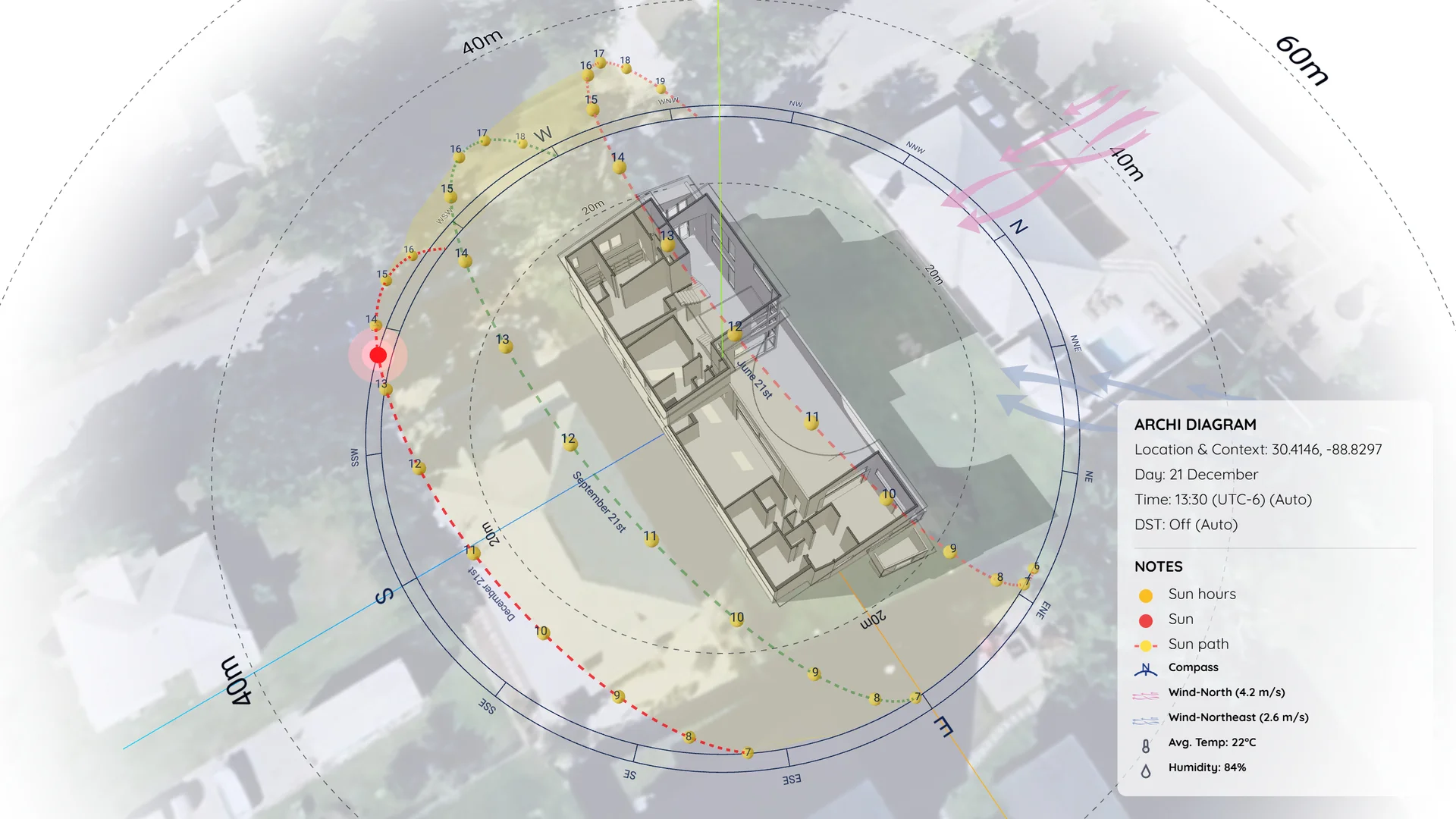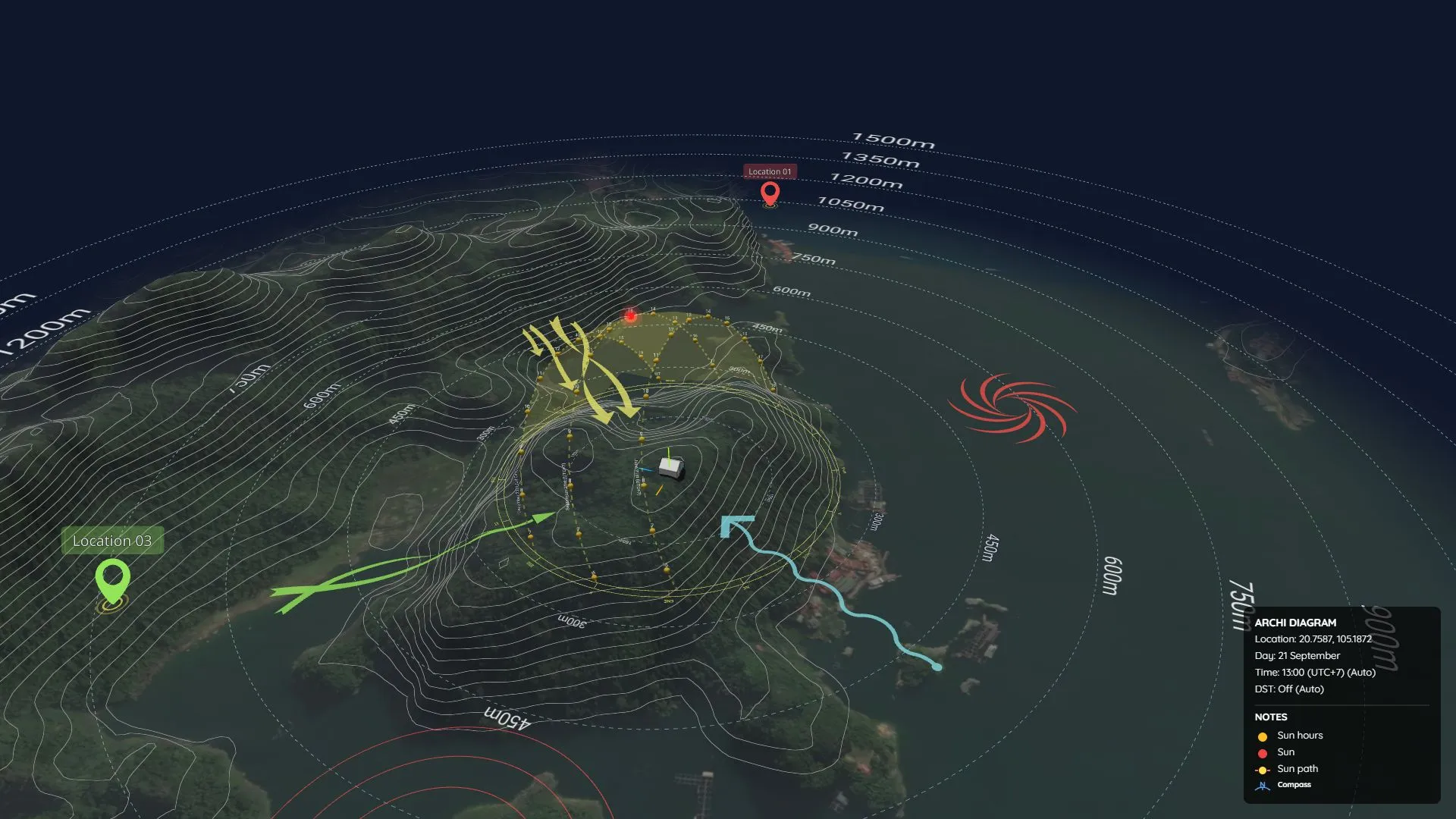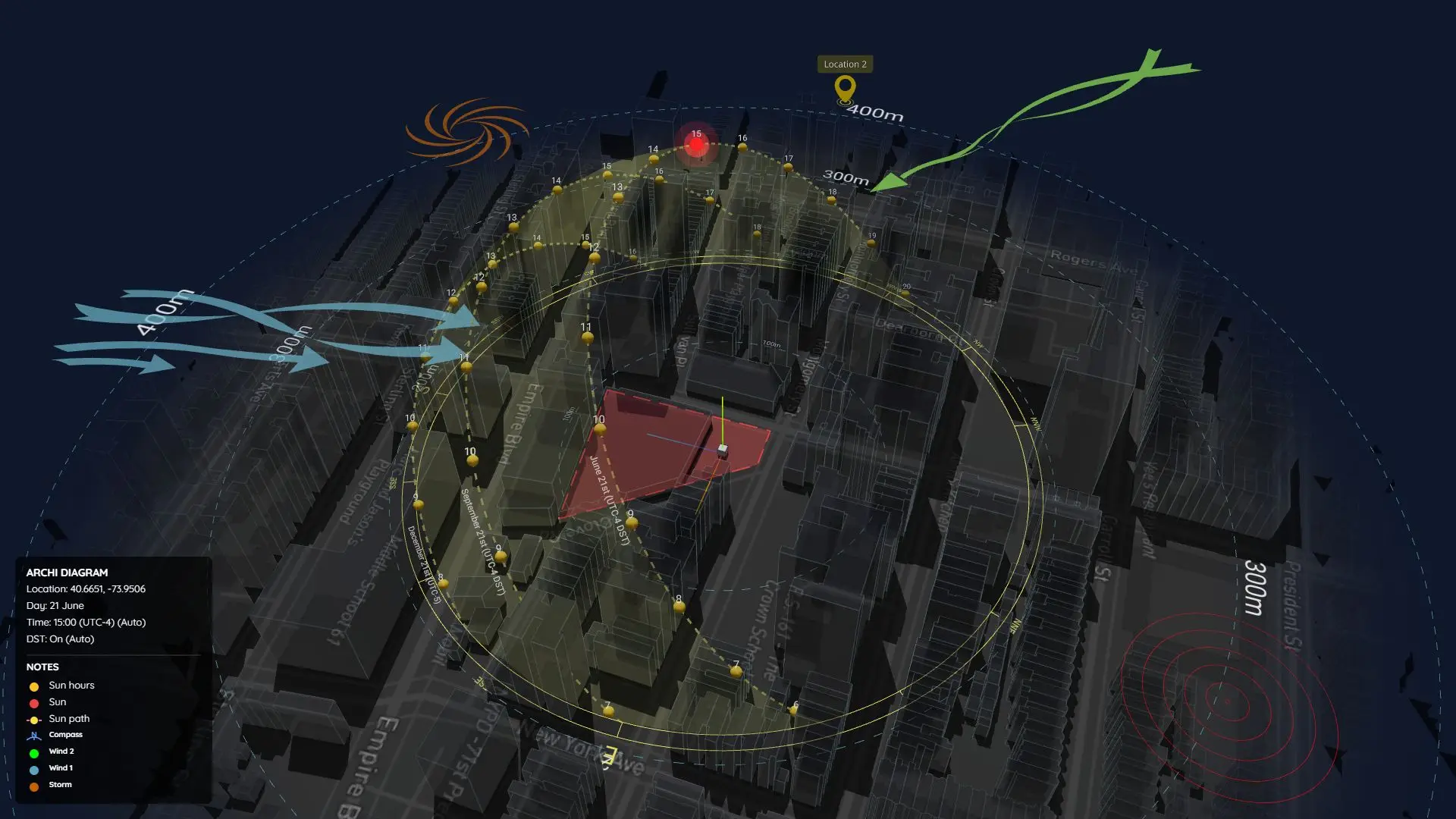

Sun Diagram
Sun Diagram is an extension for creating 3D sun paths and analyzing sunlight in architectural projects.
Features
The plugin has 04 core features.
<!-- Feature 1 Card -->
<div class="border border-slate-200 dark:border-slate-800 rounded-2xl p-6 sm:p-8 bg-slate-50/50 dark:bg-slate-900/50 shadow-sm flex flex-col md:flex-row gap-8 items-center">
  <div class="w-full md:w-1/2 shrink-0">
    <img src="/images/2026/06/1F.gif" alt="Create Sun path diagram" class="rounded-xl border border-slate-200 dark:border-slate-800 shadow-md w-full object-cover" />
  </div>
  <div class="w-full md:w-1/2 space-y-4 text-left">
    <h3 class="text-xl font-bold text-sky-600 dark:text-sky-400 hover:underline">
      <a href="https://youtu.be/hMH1T1M9wic?si=aGubLEJYJBnTxyVd&t=20" target="_blank" rel="noopener">1. Create Sunpath (Feature 1)</a>
    </h3>
    <p class="text-sm font-semibold text-slate-800 dark:text-slate-200">
      Generate a 3D Sunpath by entering your project’s location. Choose input methods:
    </p>
    <ul class="text-xs sm:text-sm text-slate-600 dark:text-slate-300 space-y-2 list-disc pl-5">
      <li><strong>Option A – From Model:</strong> Use the coordinates already embedded in your SketchUp model (via File -> Add Location).</li>
      <li><strong>Option B – Manual Input:</strong> Enter latitude and longitude directly. Coordinates can be copied from Google Maps (format example: <code>26.2649, -81.6255</code>).</li>
    </ul>
    <div class="pt-2 p-3 rounded-xl bg-amber-50 dark:bg-amber-950/40 border border-amber-200 dark:border-amber-900/50 text-xs text-amber-800 dark:text-amber-300">
      ⭐ <strong>Smart DST Engine:</strong> Enable Daylight Saving Time (DST) for highly accurate solar analysis in regions with seasonal time changes (Premium Feature).
    </div>
    <div class="flex flex-wrap gap-3 pt-2">
      <a href="/daylight-saving-time/" class="inline-flex items-center gap-1.5 px-3 py-1.5 rounded-lg bg-slate-200 dark:bg-slate-800 text-slate-800 dark:text-slate-200 text-xs font-semibold hover:bg-slate-300 dark:hover:bg-slate-700 transition-colors">
        Why is the DST feature important?
      </a>
      <a href="https://youtu.be/hMH1T1M9wic?si=aGubLEJYJBnTxyVd&t=20" target="_blank" rel="noopener" class="inline-flex items-center gap-1.5 px-3 py-1.5 rounded-lg bg-sky-50 dark:bg-sky-950/50 text-sky-600 dark:text-sky-400 border border-sky-200 dark:border-sky-800 text-xs font-bold hover:bg-sky-100 dark:hover:bg-sky-900/50 transition-colors">
        ▶️ See How It Works
      </a>
    </div>
  </div>
</div>

<!-- Feature 2 Card -->
<div class="border border-slate-200 dark:border-slate-800 rounded-2xl p-6 sm:p-8 bg-slate-50/50 dark:bg-slate-900/50 shadow-sm flex flex-col md:flex-row gap-8 items-center">
  <div class="w-full md:w-1/2 shrink-0">
    <img src="/images/2026/06/2F.gif" alt="Shadow Analysis" class="rounded-xl border border-slate-200 dark:border-slate-800 shadow-md w-full object-cover" />
  </div>
  <div class="w-full md:w-1/2 space-y-4 text-left">
    <h3 class="text-xl font-bold text-sky-600 dark:text-sky-400 hover:underline">
      <a href="https://youtu.be/hMH1T1M9wic?si=DsYa1dOm9t1ofW2e&t=79" target="_blank" rel="noopener">2. Shadow Analysis (Feature 2)</a>
    </h3>
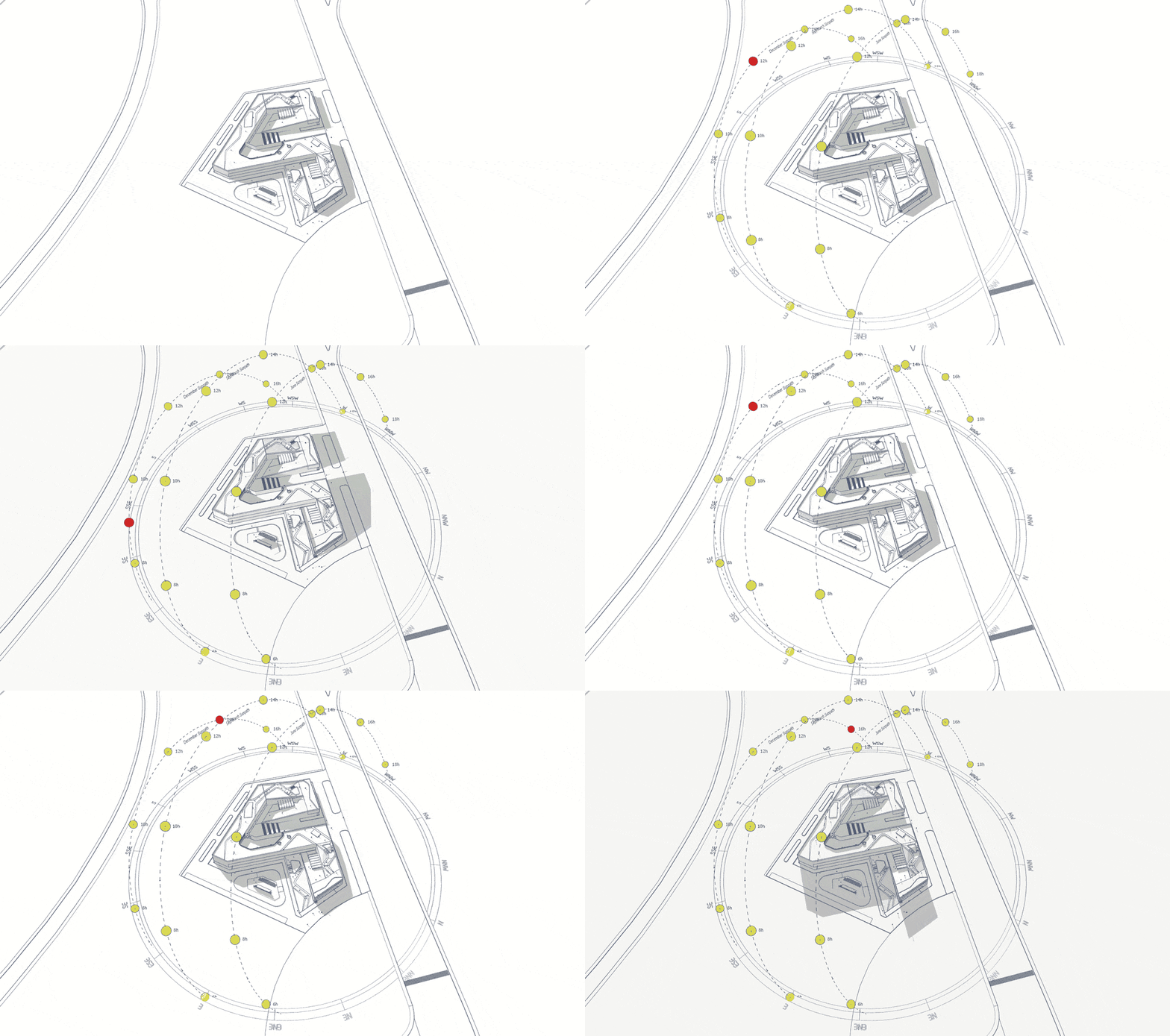
    <p class="text-sm text-slate-600 dark:text-slate-300 leading-relaxed">
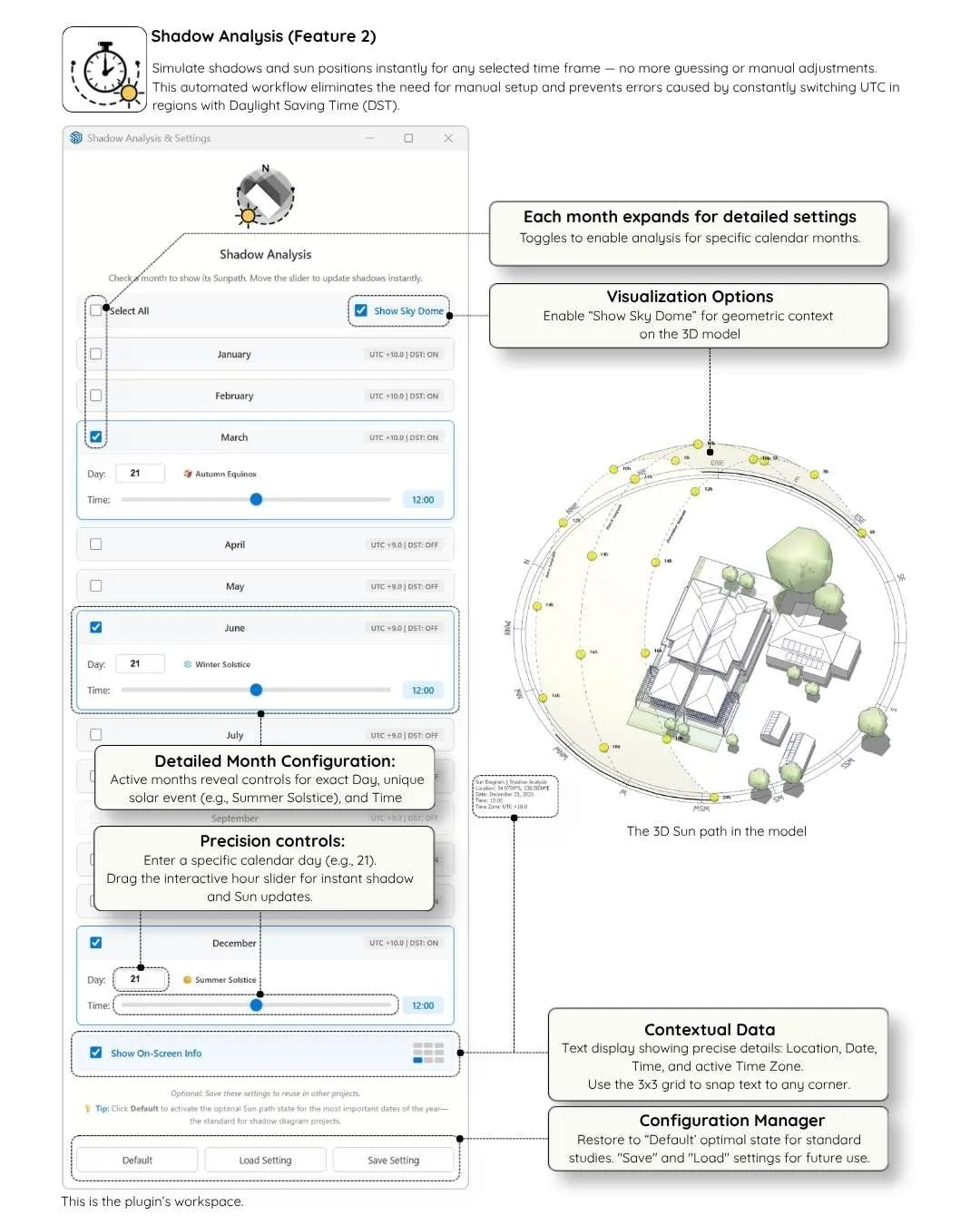
      Simulate shadows and sun positions instantly with our real-time interactive UI.
    </p>
    <ul class="text-xs sm:text-sm text-slate-600 dark:text-slate-300 space-y-2 list-disc pl-5">
      <li><strong>Real-Time Sliders:</strong> Check your desired months and drag the time slider to update shadows instantly—no guessing or clicking 'Apply'.</li>
      <li><strong>Custom Dates:</strong> Select any specific day of the month (1-31) for pinpoint accuracy, or stick to standard Solstices and Equinoxes.</li>
      <li><strong>On-Screen Info (HUD):</strong> Display real-time solar data (Location, Date, Time, UTC) directly in your viewport.</li>
    </ul>
    <div class="pt-2 p-3 rounded-xl bg-amber-50 dark:bg-amber-950/40 border border-amber-200 dark:border-amber-900/50 text-xs text-amber-800 dark:text-amber-300">
      ⭐ Automate your workflow and prevent UTC errors with built-in Daylight Saving Time (DST) support.
    </div>
    <div class="pt-2">
      <a href="https://youtu.be/hMH1T1M9wic?si=DsYa1dOm9t1ofW2e&t=79" target="_blank" rel="noopener" class="inline-flex items-center gap-1.5 px-3 py-1.5 rounded-lg bg-sky-50 dark:bg-sky-950/50 text-sky-600 dark:text-sky-400 border border-sky-200 dark:border-sky-800 text-xs font-bold hover:bg-sky-100 dark:hover:bg-sky-900/50 transition-colors">
        ▶️ See How It Works
      </a>
    </div>
  </div>
</div>

<!-- Feature 3 Card -->
<div class="border border-slate-200 dark:border-slate-800 rounded-2xl p-6 sm:p-8 bg-slate-50/50 dark:bg-slate-900/50 shadow-sm flex flex-col md:flex-row gap-8 items-center">
  <div class="w-full md:w-1/2 shrink-0">
    <img src="/images/2026/03/20260311-F3.gif" alt="Batch Export Shadows" class="rounded-xl border border-slate-200 dark:border-slate-800 shadow-md w-full object-cover" />
  </div>
  <div class="w-full md:w-1/2 space-y-4 text-left">
    <h3 class="text-xl font-bold text-sky-600 dark:text-sky-400 hover:underline">
      <a href="https://youtu.be/hMH1T1M9wic?si=UYsvk8LnAds2ccUL&t=132" target="_blank" rel="noopener">3. Batch Export Shadows (Feature 3)</a>
    </h3>
    <p class="text-sm text-slate-600 dark:text-slate-300 leading-relaxed">
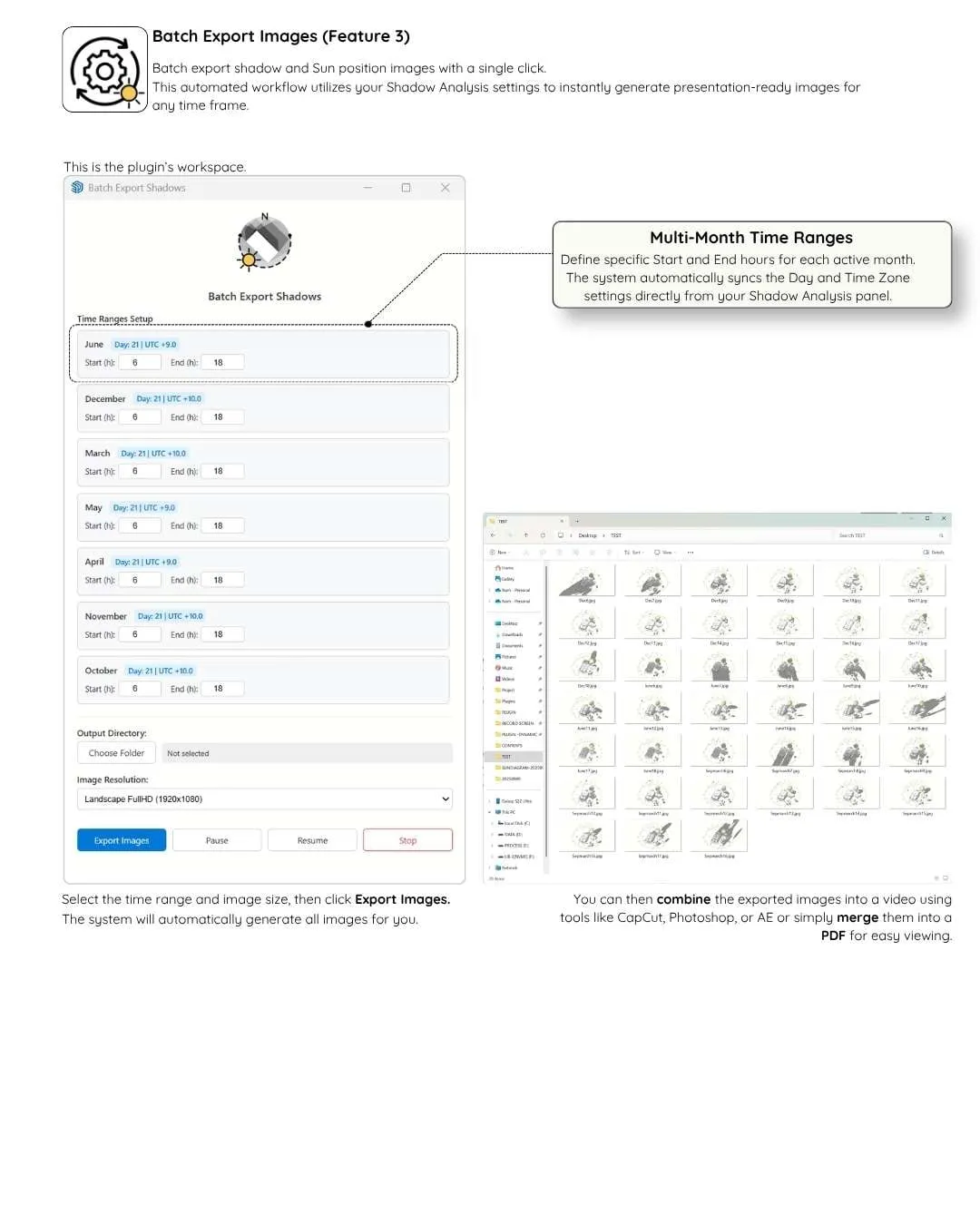
      Export shadow sequences with a single click to create stunning time-lapse animations.
    </p>
    <ul class="text-xs sm:text-sm text-slate-600 dark:text-slate-300 space-y-2 list-disc pl-5">
      <li><strong>Automated Workflow:</strong> Select your time ranges, and let the system generate all images automatically based on your Shadow Analysis settings.</li>
      <li><strong>Multiple Resolutions:</strong> Export in standard Landscape (FullHD, 2K, 4K) or Vertical formats (9:16) perfectly sized for social media (Reels, TikTok, Shorts).</li>
      <li><strong>HUD Control:</strong> Choose to include or remove the On-Screen Info watermark from your final exported frames.</li>
      <li><strong>Presentation Ready:</strong> Combine exported images into a video (CapCut, Premiere, After Effects) or merge into a PDF.</li>
    </ul>
    <div class="pt-2">
      <a href="https://youtu.be/hMH1T1M9wic?si=UYsvk8LnAds2ccUL&t=132" target="_blank" rel="noopener" class="inline-flex items-center gap-1.5 px-3 py-1.5 rounded-lg bg-sky-50 dark:bg-sky-950/50 text-sky-600 dark:text-sky-400 border border-sky-200 dark:border-sky-800 text-xs font-bold hover:bg-sky-100 dark:hover:bg-sky-900/50 transition-colors">
        ▶️ See How It Works
      </a>
    </div>
  </div>
</div>

<!-- Feature 4 Card -->
<div class="border border-slate-200 dark:border-slate-800 rounded-2xl p-6 sm:p-8 bg-slate-50/50 dark:bg-slate-900/50 shadow-sm flex flex-col md:flex-row gap-8 items-center">
  <div class="w-full md:w-1/2 shrink-0">
    <img src="/images/2026/06/4F.gif" alt="Diagram Styles" class="rounded-xl border border-slate-200 dark:border-slate-800 shadow-md w-full object-cover" />
  </div>
  <div class="w-full md:w-1/2 space-y-4 text-left">
    <h3 class="text-xl font-bold text-sky-600 dark:text-sky-400 hover:underline">
      <a href="https://www.youtube.com/shorts/G2O8383bOGk" target="_blank" rel="noopener">4. Diagram Styles (Feature 4)</a>
    </h3>
    <p class="text-sm text-slate-600 dark:text-slate-300 leading-relaxed">
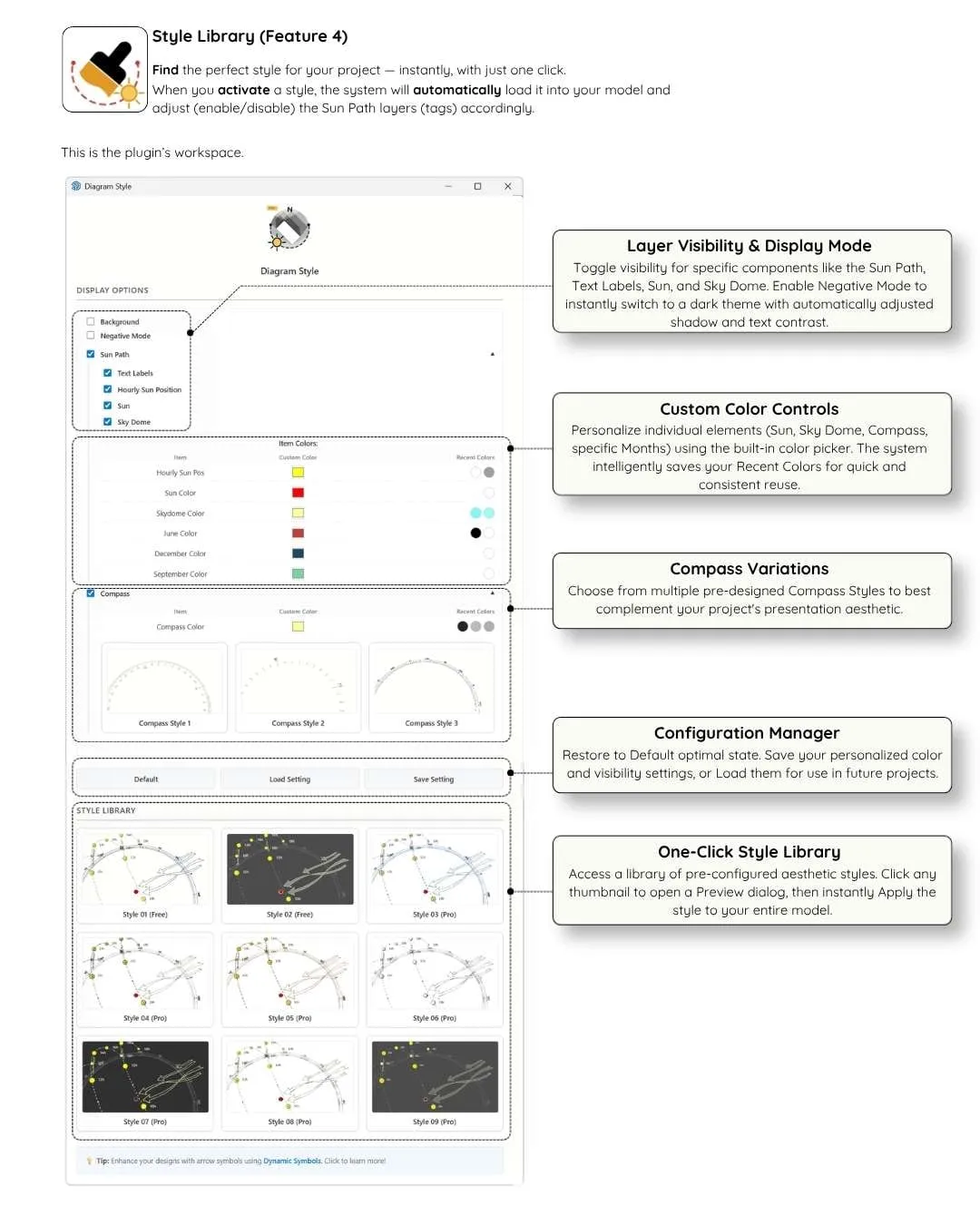
      Find the perfect visual style for your project — instantly, with just one click.
    </p>
    <ul class="text-xs sm:text-sm text-slate-600 dark:text-slate-300 space-y-2 list-disc pl-5">
      <li><strong>One-Click Activation:</strong> Load a style to automatically adjust SketchUp graphics, edge settings, and Sun Path layers (tags).</li>
      <li><strong>Premium Library:</strong> Unlock 09 professional diagram styles and 03 dynamic compass designs (Pro/Studio).</li>
      <li>The Standard (Free) version includes 02 clean, beautiful styles that fit most basic presentation needs.</li>
    </ul>
    <div class="pt-2">
      <a href="https://www.youtube.com/shorts/G2O8383bOGk" target="_blank" rel="noopener" class="inline-flex items-center gap-1.5 px-3 py-1.5 rounded-lg bg-sky-50 dark:bg-sky-950/50 text-sky-600 dark:text-sky-400 border border-sky-200 dark:border-sky-800 text-xs font-bold hover:bg-sky-100 dark:hover:bg-sky-900/50 transition-colors">
        ▶️ See How It Works
      </a>
    </div>
  </div>
</div>
What You Can Do with Sun Diagram:
☀️ 1. Shadow diagram
🌍 2. Solar study
🏢 3. Shadow analysis
🚀 4. And more
Get Sun Diagram
Choose the license that fits your professional workflow
<div class="grid grid-cols-1 md:grid-cols-2 gap-8 pt-4">
  <!-- STANDARD (FREE) CARD -->
  <div class="border border-slate-200 dark:border-slate-700 rounded-2xl overflow-hidden bg-white dark:bg-slate-900 shadow-lg flex flex-col justify-between">
    <div>
      <div class="bg-slate-800 text-white text-center py-4 px-6">
        <h3 class="text-lg font-black tracking-wide uppercase">Sun Diagram Standard</h3>
        <p class="text-xs text-slate-300 mt-1">Free for all users, commercial work permitted.</p>
      </div>
      <div class="p-6 sm:p-8 space-y-4 text-sm text-slate-700 dark:text-slate-300">
        <div class="flex items-start gap-2">
          <span class="text-emerald-500 font-bold">✔️</span>
          <div><strong>Generate 3D Sun Path:</strong> Scientifically accurate from coordinates.</div>
        </div>
        <div class="flex items-start gap-2">
          <span class="text-rose-500 font-bold">❌</span>
          <div><strong>No DST Support:</strong> Base UTC time only.</div>
        </div>
        <div class="flex items-start gap-2">
          <span class="text-slate-400 font-bold">➖</span>
          <div><strong>Core Shadow Analysis:</strong> June & December only (Any day & hour for Solstice testing).</div>
        </div>
        <div class="flex items-start gap-2">
          <span class="text-slate-400 font-bold">➖</span>
          <div><strong>Standard Batch Export:</strong> June & December only (Locked to FullHD 1080p).</div>
        </div>
        <div class="flex items-start gap-2">
          <span class="text-slate-400 font-bold">➖</span>
          <div><strong>Diagram Style:</strong> 02 Basic Styles + Customize colors and toggle Sun/Skydome visibility.</div>
        </div>
        <div class="flex items-start gap-2">
          <span class="text-emerald-500 font-bold">✔️</span>
          <div><strong>Updates:</strong> Auto via SketchUp Extension Warehouse</div>
        </div>
      </div>
    </div>
    <div class="p-6 bg-slate-50 dark:bg-slate-800/50 border-t border-slate-100 dark:border-slate-800 text-center space-y-3">
      <a href="https://extensions.sketchup.com/extension/5aa1ab3d-36ff-4510-ae63-84f677a36f3a/sun-diagram" target="_blank" rel="noopener" class="block w-full py-3 px-6 rounded-xl bg-slate-900 hover:bg-slate-800 text-white dark:bg-white dark:text-slate-900 font-bold text-sm shadow-md transition-all">
        Free Download on Extension Warehouse
      </a>
      <p class="text-xs text-slate-500 dark:text-slate-400">
        Alternative free download via <a href="https://drive.google.com/file/d/1NOrnKiSXEv71vL9cXiMCK5DK9AU4Gz1S/" target="_blank" rel="noopener" class="text-amber-500 underline font-medium">Google Drive</a>
      </p>
    </div>
  </div>

  <!-- SUN DIAGRAM PRO CARD -->
  <div class="border-2 border-amber-400/80 rounded-2xl overflow-hidden bg-white dark:bg-slate-900 shadow-xl flex flex-col justify-between relative">
    <div class="absolute top-3 right-3 bg-amber-400 text-slate-950 text-[10px] font-black uppercase px-2.5 py-0.5 rounded-full shadow-sm">
      Recommended ⭐
    </div>
    <div>
      <div class="bg-gradient-to-r from-slate-900 to-slate-800 text-white text-center py-4 px-6">
        <h3 class="text-lg font-black tracking-wide uppercase text-amber-400">Sun Diagram Pro ⭐</h3>
        <p class="text-xs text-slate-300 mt-1">Unlock full features. Annual Subscription or Lifetime Ownership.</p>
      </div>
      <div class="p-6 sm:p-8 space-y-4 text-sm text-slate-700 dark:text-slate-300">
        <div class="flex items-start gap-2">
          <span class="text-emerald-500 font-bold">✔️</span>
          <div><strong>Generate 3D Sun Path:</strong> Scientifically accurate from coordinates.</div>
        </div>
        <div class="flex items-start gap-2">
          <span class="text-emerald-500 font-bold">✔️</span>
          <div><strong class="text-sky-600 dark:text-sky-400">Smart DST Engine:</strong> Automatic Daylight Saving Time adjustment.</div>
        </div>
        <div class="flex items-start gap-2">
          <span class="text-emerald-500 font-bold">✔️</span>
          <div><strong class="text-sky-600 dark:text-sky-400">Full Shadow Analysis:</strong> <strong>All 12 Months</strong> (Any day & hour, full solar mastery).</div>
        </div>
        <div class="flex items-start gap-2">
          <span class="text-emerald-500 font-bold">✔️</span>
          <div><strong class="text-sky-600 dark:text-sky-400">Advanced Batch Export:</strong> <strong>All 12 Months</strong> (Unlock 2K, 4K, Vertical 9:16, 100% Watermark-Free).</div>
        </div>
        <div class="flex items-start gap-2">
          <span class="text-emerald-500 font-bold">✔️</span>
          <div><strong class="text-sky-600 dark:text-sky-400">Diagram Style:</strong> All 09 Pro Styles + Unlimited color control & Negative Mode.</div>
        </div>
        <div class="flex items-start gap-2">
          <span class="text-emerald-500 font-bold">✔️</span>
          <div><strong>Updates:</strong> Auto via Extension Warehouse / SketchUcation or Gumroad.</div>
        </div>
      </div>
    </div>
    <div class="p-6 bg-slate-50 dark:bg-slate-800/50 border-t border-slate-100 dark:border-slate-800 space-y-3">
      <a href="https://extensions.sketchup.com/extension/b2e8e5b3-7dc1-45b9-813c-8c9c553d461b/sun-diagram-studio" target="_blank" rel="noopener" class="block w-full py-3 px-6 rounded-xl bg-amber-400 hover:bg-amber-300 text-slate-950 font-bold text-sm text-center shadow-md transition-all">
        Subscribe Pro Studio ($15 USD / year)
      </a>
      <a href="https://febhouse.gumroad.com/l/Sundiagram" target="_blank" rel="noopener" class="block w-full py-3 px-6 rounded-xl border border-slate-300 dark:border-slate-600 hover:bg-slate-100 dark:hover:bg-slate-800 text-slate-900 dark:text-white font-bold text-sm text-center transition-all">
        Buy Lifetime Pro ($45 USD One-time)
      </a>
      <div class="text-center text-xs text-slate-500 pt-1">
        <a href="https://sketchucation.com/plugin/3102-febsundiagrampro" target="_blank" rel="noopener" class="hover:text-amber-500 underline">Prefer SketchUcation? Get it here.</a>
      </div>
    </div>
  </div>
</div>

<!-- Developer & Support Note -->
<div class="p-4 rounded-xl bg-slate-100 dark:bg-slate-800/60 text-center text-xs text-slate-600 dark:text-slate-400 space-y-1">
  <p>Sun Diagram is developed by <strong>Febhouse</strong>.</p>
  <p>📩 Support: <a href="mailto:[email protected]" class="text-amber-500 font-medium underline">[email protected]</a> (response within 24h)</p>
</div>
Version 4.5.5
2026-07-03
🛠️ Bug Fixes & Stability Improvements: Text Stability on Save/Autosave: Fixed a critical issue where sun path hour labels (12h, 14h, 16h, etc.) would randomly disappear when saving the model in SketchUp 2023 and 2026.
<!-- Expandable Legacy Changelog Accordion -->
<details class="group mt-4 pt-4 border-t border-slate-200 dark:border-slate-800 cursor-pointer">
  <summary class="font-bold text-sm text-sky-600 dark:text-sky-400 flex items-center justify-between list-none py-2 hover:text-sky-500">
    <span>📜 View Legacy Changelog (V1.0 - V4.5.0)</span>
    <span class="text-xs text-slate-400 transition-transform group-open:rotate-180">▼</span>
  </summary>
  <div class="mt-4 space-y-4 text-xs text-slate-600 dark:text-slate-300 pl-4 border-l-2 border-slate-200 dark:border-slate-700">
    <div>
      <strong class="text-slate-900 dark:text-white">Version 4.5.0 (2026-06-06)</strong>
      <p>✔️ Comprehensive Diagram Style Upgrade: Overhauled Diagram Style panel with intuitive controls.</p>
      <p>✔️ Ultra-Clean Sun Path: Removed Section Slice at the base for a distraction-free 3D model.</p>
    </div>
    <div>
      <strong class="text-slate-900 dark:text-white">Version 4.0.2 (2026-04-01)</strong>
      <p>✔️ Flexible 3D Sun Path & Sky Dome: Dynamic solar dome across all 12 months with solstice/equinox markers.</p>
      <p>✔️ Instant Shadow Control & Smart DST: Interactive dashboard with automatic daylight saving time calculation.</p>
      <p>✔️ One-Click Batch Export: Automated high-res shadow sequence generation up to 4K.</p>
    </div>
    <div>
      <strong class="text-slate-900 dark:text-white">Version 3.5.1 (2026-02-11)</strong>
      <p>✔️ Smart Time Zone Engine: Removed hardcoded UTC+8 override for East Asia.</p>
      <p>✔️ Stability & Security: Optimized Undo/Redo stack performance and enhanced Windows/Unicode path handling.</p>
    </div>
    <div>
      <strong class="text-slate-900 dark:text-white">Version 3.5 (2026-02-06)</strong>
      <p>✔️ Regional Time Zone Overrides and 9:16 vertical resolution export support for social media reels.</p>
    </div>
    <div>
      <strong class="text-slate-900 dark:text-white">Version 3.4 (2025-11-25)</strong>
      <p>✔️ Added yellow 3D Dome surrounding Sun Path assigned to Feb_Dome tag.</p>
    </div>
    <div>
      <strong class="text-slate-900 dark:text-white">Version 3.0 (2025-06-18)</strong>
      <p>✔️ Added 3D Sun Position locator and real-time shadow slider integration.</p>
    </div>
    <div>
      <strong class="text-slate-900 dark:text-white">Version 2.0 (2024-11-15)</strong>
      <p>✔️ Custom solstices, equinox rings, and automated diagram style presets.</p>
    </div>
    <div>
      <strong class="text-slate-900 dark:text-white">Version 1.0 (2024-08-20)</strong>
      <p>✔️ Initial release: 3D Sun Path generation based on geographic latitude and longitude.</p>
    </div>
  </div>
</details>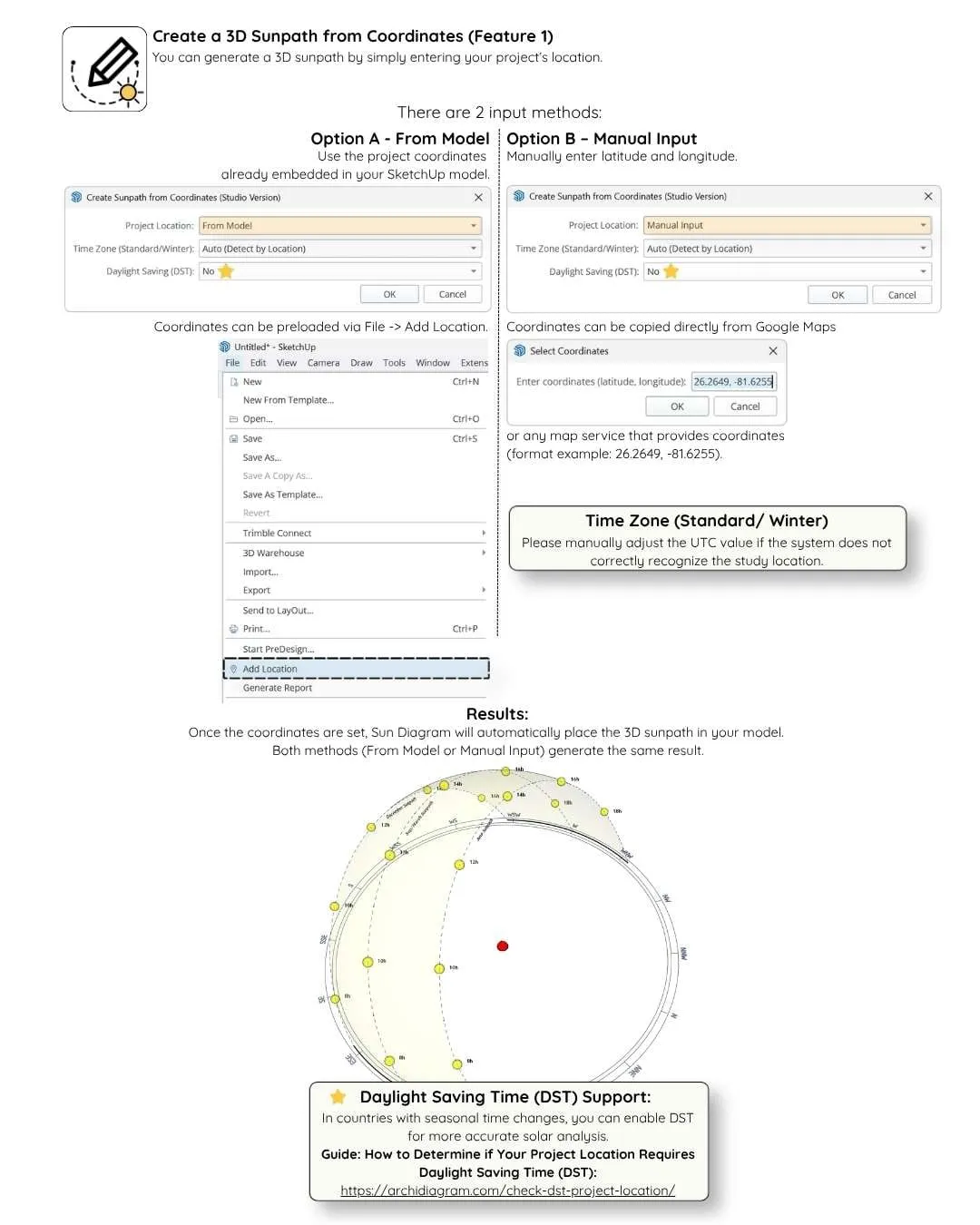
Frequently Asked Questions
<details class="group p-4 sm:p-5 rounded-xl bg-slate-50 dark:bg-slate-900/60 border border-slate-200 dark:border-slate-800 cursor-pointer transition-all hover:border-amber-400/50">
  <summary class="font-bold text-sm sm:text-base text-slate-900 dark:text-white flex items-center justify-between list-none">
    <span>Why is the DST (Daylight Saving Time) feature important?</span>
    <span class="text-amber-500 transition-transform group-open:rotate-180 text-xs">▼</span>
  </summary>
  <div class="mt-3 text-sm text-slate-600 dark:text-slate-300 leading-relaxed pt-3 border-t border-slate-200/60 dark:border-slate-800/60 space-y-2">
    <p>In regions observing Daylight Saving Time (such as the US, Europe, and Australia), clocks shift forward 1 hour in spring and back 1 hour in autumn.</p>
    <p>Without DST compensation, sunlight simulations during summer will be off by a full hour (15 degrees of solar rotation). Sun Diagram Pro calculates DST automatically based on your location coordinates and chosen date.</p>
  </div>
</details>

<details class="group p-4 sm:p-5 rounded-xl bg-slate-50 dark:bg-slate-900/60 border border-slate-200 dark:border-slate-800 cursor-pointer transition-all hover:border-amber-400/50">
  <summary class="font-bold text-sm sm:text-base text-slate-900 dark:text-white flex items-center justify-between list-none">
    <span>Which SketchUp versions are compatible?</span>
    <span class="text-amber-500 transition-transform group-open:rotate-180 text-xs">▼</span>
  </summary>
  <div class="mt-3 text-sm text-slate-600 dark:text-slate-300 leading-relaxed pt-3 border-t border-slate-200/60 dark:border-slate-800/60">
    Sun Diagram supports SketchUp 2020, 2021, 2022, 2023, 2024, 2025, and 2026 on both Windows and macOS (including Apple Silicon M1/M2/M3/M4).
  </div>
</details>

<details class="group p-4 sm:p-5 rounded-xl bg-slate-50 dark:bg-slate-900/60 border border-slate-200 dark:border-slate-800 cursor-pointer transition-all hover:border-amber-400/50">
  <summary class="font-bold text-sm sm:text-base text-slate-900 dark:text-white flex items-center justify-between list-none">
    <span>What is the difference between Pro Studio and Pro Lifetime?</span>
    <span class="text-amber-500 transition-transform group-open:rotate-180 text-xs">▼</span>
  </summary>
  <div class="mt-3 text-sm text-slate-600 dark:text-slate-300 leading-relaxed pt-3 border-t border-slate-200/60 dark:border-slate-800/60">
    Both provide 100% full features. Pro Studio is an annual subscription ($15/year) managed through the Extension Warehouse with auto-updates. Pro Lifetime is a one-time purchase ($45) via Gumroad with perpetual offline use and free updates.
  </div>
</details>

<details class="group p-4 sm:p-5 rounded-xl bg-slate-50 dark:bg-slate-900/60 border border-slate-200 dark:border-slate-800 cursor-pointer transition-all hover:border-amber-400/50">
  <summary class="font-bold text-sm sm:text-base text-slate-900 dark:text-white flex items-center justify-between list-none">
    <span>How does Batch Export Shadows work?</span>
    <span class="text-amber-500 transition-transform group-open:rotate-180 text-xs">▼</span>
  </summary>
  <div class="mt-3 text-sm text-slate-600 dark:text-slate-300 leading-relaxed pt-3 border-t border-slate-200/60 dark:border-slate-800/60">
    Select your date and time range (e.g., 8:00 AM to 5:00 PM at 30-minute intervals). The plugin automatically loops through the sun positions, rendering high-resolution frames into your specified output folder ready for video creation or PDF presentation boards.
  </div>
</details>