Shadow Slice Pro 2.0
Interior Shadow & Section Tool For SketchUp. Cut away walls and roofs while keeping their natural shadows. The perfect tool for interior sunlight simulation.
Features
The Plugin has 03 Core Features.
<!-- Feature 1 Card -->
<div class="border border-slate-200 dark:border-slate-800 rounded-2xl p-6 sm:p-8 bg-slate-50/50 dark:bg-slate-900/50 shadow-sm flex flex-col md:flex-row gap-8 items-center">
  <div class="w-full md:w-1/2 shrink-0">
    <img src="/images/2026/06/Feature02.gif" alt="1-Click Interactive Slicing" class="rounded-xl border border-slate-200 dark:border-slate-800 shadow-md w-full object-cover" />
  </div>
  <div class="w-full md:w-1/2 space-y-4 text-left">
    <h3 class="text-xl font-bold text-sky-600 dark:text-sky-400">
      1. 1-Click Interactive Slicing
    </h3>
    <p class="text-sm text-slate-600 dark:text-slate-300 leading-relaxed">
      Forget tedious manual section setups or deleting roofs. Simply click the <strong>+ Add Slice Tool</strong> on the Shadow Slice dashboard, click directly on the Group or Component you want to cut, and you're done!
    </p>
    <p class="text-xs text-slate-500 dark:text-slate-400">
      Ceilings and upper walls become transparent to camera while remaining 100% solid to sunlight.
    </p>
  </div>
</div>

<!-- Feature 2 Card -->
<div class="border border-slate-200 dark:border-slate-800 rounded-2xl p-6 sm:p-8 bg-slate-50/50 dark:bg-slate-900/50 shadow-sm flex flex-col md:flex-row gap-8 items-center">
  <div class="w-full md:w-1/2 shrink-0">
    <img src="/images/2026/06/Feature1-1.gif" alt="Centralized Dashboard" class="rounded-xl border border-slate-200 dark:border-slate-800 shadow-md w-full object-cover" />
  </div>
  <div class="w-full md:w-1/2 space-y-4 text-left">
    <h3 class="text-xl font-bold text-sky-600 dark:text-sky-400">
      2. Centralized Dashboard
    </h3>
    <p class="text-sm text-slate-600 dark:text-slate-300 leading-relaxed">
      All your active Shadow Slices are managed visually inside a single, intuitive control panel. Instantly toggle visibility, adjust slice positions, or customize section fill colors on the fly.
    </p>
  </div>
</div>

<!-- Feature 3 Card -->
<div class="border border-slate-200 dark:border-slate-800 rounded-2xl p-6 sm:p-8 bg-slate-50/50 dark:bg-slate-900/50 shadow-sm flex flex-col md:flex-row gap-8 items-center">
  <div class="w-full md:w-1/2 shrink-0">
    <img src="/images/2026/06/Feature03.gif" alt="Smart Style Management" class="rounded-xl border border-slate-200 dark:border-slate-800 shadow-md w-full object-cover" />
  </div>
  <div class="w-full md:w-1/2 space-y-4 text-left">
    <h3 class="text-xl font-bold text-sky-600 dark:text-sky-400">
      3. Smart Style Management
    </h3>
    <p class="text-sm text-slate-600 dark:text-slate-300 leading-relaxed">
      Shadow Slice automates the background style configurations, layer management, and shadow settings, letting you focus 100% on your design concepts without breaking exterior lighting.
    </p>
  </div>
</div>
Use Cases
How Shadow Slice Helps Your Workflow
<!-- Use Case 1 -->
<div class="border border-slate-200 dark:border-slate-800 rounded-2xl p-6 bg-white dark:bg-slate-900 shadow-sm flex flex-col md:flex-row gap-6 items-center">
  <div class="w-full md:w-1/2 shrink-0">
    <img src="/images/2026/01/QC1-copy.webp" alt="Interior Natural Light Analysis" class="rounded-xl border border-slate-200 dark:border-slate-800 shadow w-full object-cover" />
  </div>
  <div class="w-full md:w-1/2 space-y-3 text-left">
    <h3 class="text-lg font-bold text-slate-900 dark:text-white">1. Interior Natural Light Analysis</h3>
    <p class="text-sm text-slate-600 dark:text-slate-300 leading-relaxed">
      Shadow Slice makes ceilings and upper walls transparent to the camera while keeping them completely solid to sunlight. Look inside and analyze realistic natural light distribution throughout the entire floor plan.
    </p>
  </div>
</div>

<!-- Use Case 2 -->
<div class="border border-slate-200 dark:border-slate-800 rounded-2xl p-6 bg-white dark:bg-slate-900 shadow-sm flex flex-col md:flex-row gap-6 items-center">
  <div class="w-full md:w-1/2 shrink-0">
    <img src="/images/2026/01/QC2.webp" alt="Smart Section Compensation" class="rounded-xl border border-slate-200 dark:border-slate-800 shadow w-full object-cover" />
  </div>
  <div class="w-full md:w-1/2 space-y-3 text-left">
    <h3 class="text-lg font-bold text-slate-900 dark:text-white">2. Smart Section Compensation</h3>
    <p class="text-sm text-slate-600 dark:text-slate-300 leading-relaxed">
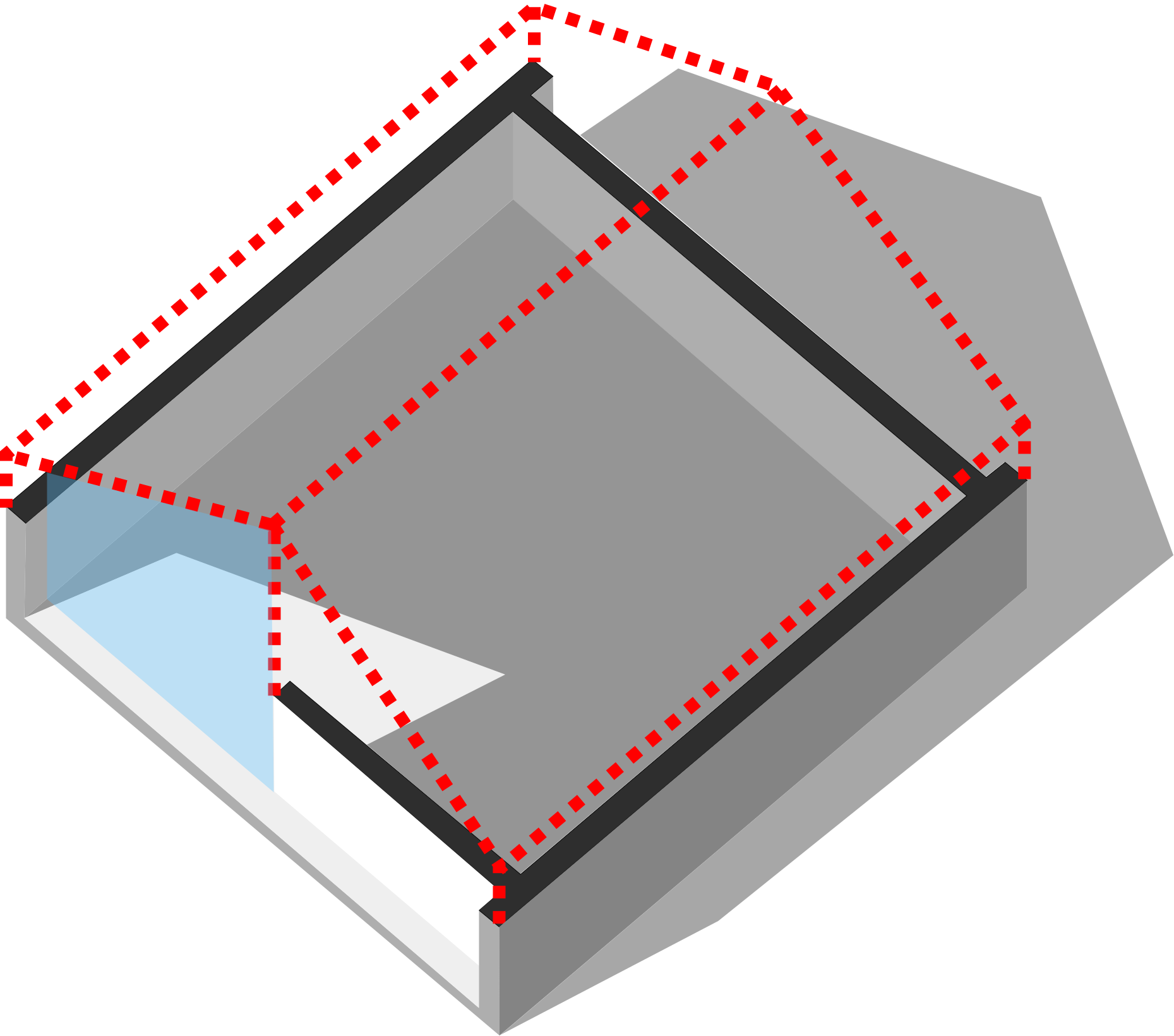
      Traditional section planes let sunlight flood in from the cut plane, completely ruining interior shadow accuracy. Shadow Slice automatically compensates for the removed section, keeping shadow casting 100% physically accurate.
    </p>
  </div>
</div>

<!-- Use Case 3 -->
<div class="border border-slate-200 dark:border-slate-800 rounded-2xl p-6 bg-white dark:bg-slate-900 shadow-sm flex flex-col md:flex-row gap-6 items-center">
  <div class="w-full md:w-1/2 shrink-0">
    <img src="/images/2026/01/QC3.webp" alt="Section-Based Shadow Study" class="rounded-xl border border-slate-200 dark:border-slate-800 shadow w-full object-cover" />
  </div>
  <div class="w-full md:w-1/2 space-y-3 text-left">
    <h3 class="text-lg font-bold text-slate-900 dark:text-white">3. Section-Based Shadow Study</h3>
    <p class="text-sm text-slate-600 dark:text-slate-300 leading-relaxed">
      Analyze interior shadow behavior directly within longitudinal or transverse section views. Perfect for daylighting reports and client documentation.
    </p>
  </div>
</div>

<!-- Use Case 4 -->
<div class="border border-slate-200 dark:border-slate-800 rounded-2xl p-6 bg-white dark:bg-slate-900 shadow-sm flex flex-col md:flex-row gap-6 items-center">
  <div class="w-full md:w-1/2 shrink-0">
    <img src="/images/2026/01/QC4.webp" alt="Perspective Cutaway Visualization" class="rounded-xl border border-slate-200 dark:border-slate-800 shadow w-full object-cover" />
  </div>
  <div class="w-full md:w-1/2 space-y-3 text-left">
    <h3 class="text-lg font-bold text-slate-900 dark:text-white">4. Perspective Cutaway Visualization</h3>
    <p class="text-sm text-slate-600 dark:text-slate-300 leading-relaxed">
      Create stunning 3D perspective sections that communicate spatial flow and interior massing without losing environmental context.
    </p>
  </div>
</div>
Get Shadow Slice
Available on Extension Warehouse and SketchUcation
<div class="grid grid-cols-1 md:grid-cols-2 gap-8 pt-4">
  <!-- STANDARD (14-DAY TRIAL) -->
  <div class="border border-slate-200 dark:border-slate-700 rounded-2xl overflow-hidden bg-white dark:bg-slate-900 shadow-lg flex flex-col justify-between">
    <div>
      <div class="bg-slate-800 text-white text-center py-4 px-6">
        <h3 class="text-lg font-black tracking-wide uppercase">Standard (14-Day Free Trial)</h3>
        <p class="text-xs text-slate-300 mt-1">Full access to test in all your SketchUp models.</p>
      </div>
      <div class="p-6 sm:p-8 space-y-4 text-sm text-slate-700 dark:text-slate-300">
        <div class="flex items-start gap-2">
          <span class="text-emerald-500 font-bold">✔️</span>
          <div><strong>1-Click Interactive Slicing</strong></div>
        </div>
        <div class="flex items-start gap-2">
          <span class="text-emerald-500 font-bold">✔️</span>
          <div><strong>Centralized Control Dashboard</strong></div>
        </div>
        <div class="flex items-start gap-2">
          <span class="text-emerald-500 font-bold">✔️</span>
          <div><strong>Smart Section Compensation</strong></div>
        </div>
        <div class="flex items-start gap-2">
          <span class="text-emerald-500 font-bold">✔️</span>
          <div><strong>14 Days Full Access</strong></div>
        </div>
      </div>
    </div>
    <div class="p-6 bg-slate-50 dark:bg-slate-800/50 border-t border-slate-100 dark:border-slate-800 text-center space-y-3">
      <a href="https://extensions.sketchup.com/extension/e10f7017-931a-45a9-8e5d-d65df0926ddd/shadow-slice" target="_blank" rel="noopener" class="block w-full py-3 px-6 rounded-xl bg-slate-900 hover:bg-slate-800 text-white dark:bg-white dark:text-slate-900 font-bold text-sm shadow-md transition-all">
        Download Free Trial on Extension Warehouse
      </a>
    </div>
  </div>

  <!-- PRO VERSION -->
  <div class="border-2 border-amber-400/80 rounded-2xl overflow-hidden bg-white dark:bg-slate-900 shadow-xl flex flex-col justify-between relative">
    <div class="absolute top-3 right-3 bg-amber-400 text-slate-950 text-[10px] font-black uppercase px-2.5 py-0.5 rounded-full shadow-sm">
      Lifetime License ⭐
    </div>
    <div>
      <div class="bg-gradient-to-r from-slate-900 to-slate-800 text-white text-center py-4 px-6">
        <h3 class="text-lg font-black tracking-wide uppercase text-amber-400">Shadow Slice Pro ⭐</h3>
        <p class="text-xs text-slate-300 mt-1">Unlimited commercial license with lifetime updates.</p>
      </div>
      <div class="p-6 sm:p-8 space-y-4 text-sm text-slate-700 dark:text-slate-300">
        <div class="flex items-start gap-2">
          <span class="text-emerald-500 font-bold">✔️</span>
          <div><strong>Unlimited Slices per Model</strong></div>
        </div>
        <div class="flex items-start gap-2">
          <span class="text-emerald-500 font-bold">✔️</span>
          <div><strong>Batch Slice Management</strong></div>
        </div>
        <div class="flex items-start gap-2">
          <span class="text-emerald-500 font-bold">✔️</span>
          <div><strong>Custom Section Fill Colors & Transparency</strong></div>
        </div>
        <div class="flex items-start gap-2">
          <span class="text-emerald-500 font-bold">✔️</span>
          <div><strong>Lifetime Free Updates & Support</strong></div>
        </div>
      </div>
    </div>
    <div class="p-6 bg-slate-50 dark:bg-slate-800/50 border-t border-slate-100 dark:border-slate-800 space-y-3">
      <a href="https://extensions.sketchup.com/extension/961497ac-df23-458b-a1ca-777e798c7084/shadow-slice-pro" target="_blank" rel="noopener" class="block w-full py-3 px-6 rounded-xl bg-amber-400 hover:bg-amber-300 text-slate-950 font-bold text-sm text-center shadow-md transition-all">
        Get Pro on Extension Warehouse
      </a>
    </div>
  </div>
</div>