Small 1-Story Townhouse Design: Free Daylight Optimization Sample (Sample - 63)
Great architecture isn’t exclusive to luxury villas with massive budgets. In fact, smart design is most critical in compact, budget-friendly projects. This sample shares the source files for a Small 1-Story Townhouse (often called a tube house), demonstrating how careful solar analysis can drastically improve the daily living experience without adding construction costs.
When space is limited and the budget is tight, optimizing natural light and passive design is the key to making a small home feel spacious, healthy, and comfortable.
Why Analyze Small & Budget-Friendly Homes?
Townhouses typically share walls with neighbors, meaning natural light can only enter from the front and rear. If not planned correctly, the core of the house becomes dark and damp. By running a daylight study early in the design phase, you can:
Enhance Spatial Perception: Natural light makes tight spaces feel much larger.
Reduce Energy Bills: Strategically placing clerestory windows or skylights minimizes the need for artificial lighting and air conditioning.
Improve Well-being: Tracking how the sun enters the living and sleeping areas ensures a healthier indoor environment year-round.
What This Sample Focuses On
This downloadable SketchUp file provides a clear workflow for testing and proving your daylight strategy in narrow plots:
1. Deep Light Penetration
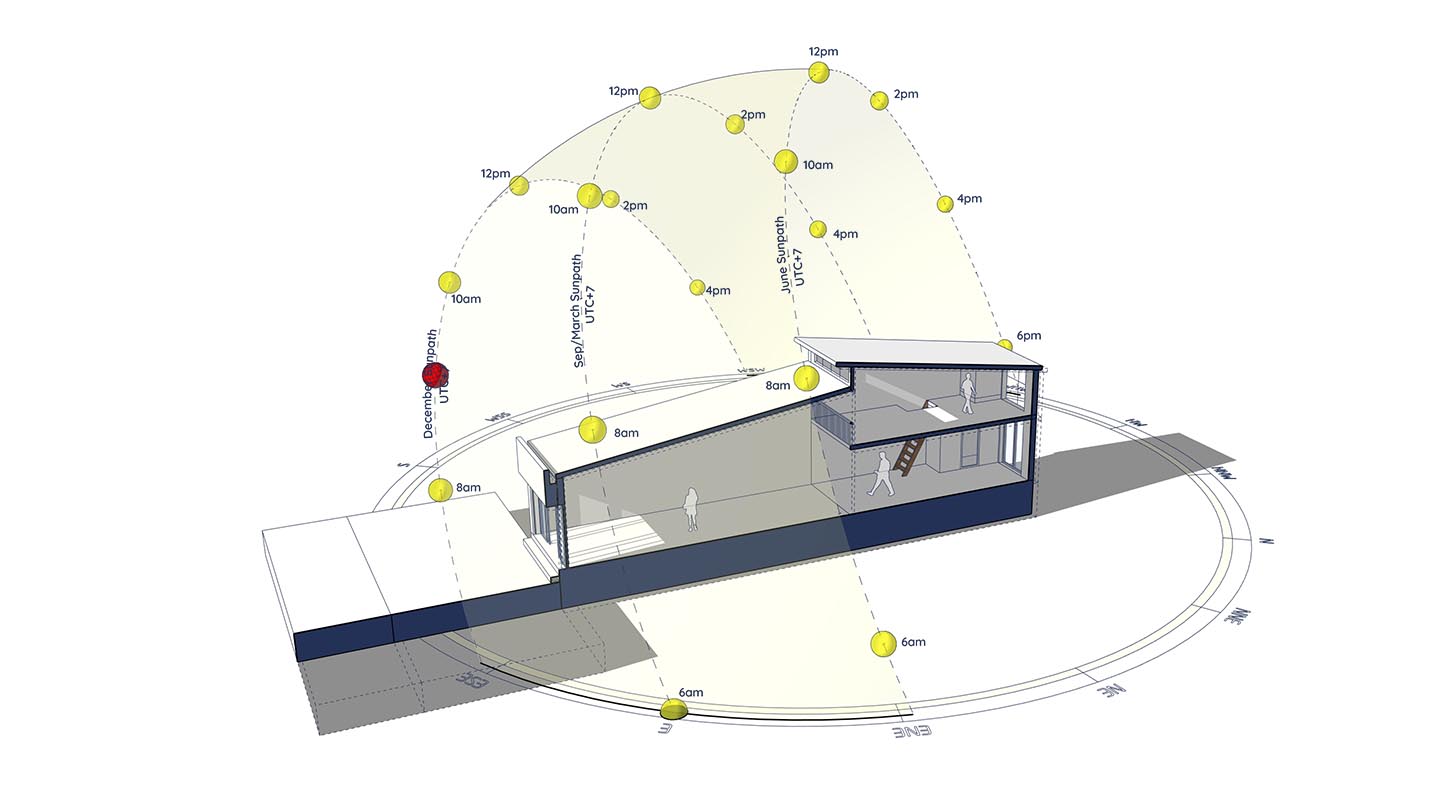
The model features a slanted roof with clerestory windows designed to pull light into the center of the deep floor plan. The analysis proves whether this window sizing and placement is effective.
2. The “Sliced” Interior View
To truly understand how light interacts with the space, we must look inside. (Workflow Secret: Instead of hiding the roof—which would ruin the shadow calculations—this model uses the Shadow Slice plugin. It cleanly cuts the upper geometry, allowing you to see the true interior shadow patterns on the floor plan).
3. Winter Solstice Animation
The setup specifically tests December 21st (the winter solstice, when the sun is at its lowest). (Pro Tip: The animated 3D sun path and precise solar tracking are driven by the Sun Diagram plugin, making it easy to export smooth sun-study videos).
Video Preview:
Watch the included video to see the workflow in action. You can clearly see how the moving sun casts dynamic light deep into the living spaces, ensuring the home stays warm and bright even on the shortest day of the year.
Essential Tools for this Workflow
To replicate this highly effective analysis for your own small-scale or low-budget projects, we recommend adding these tools to your SketchUp workflow:
Shadow Slice: Essential for cutting the building open to visualize the interior layout without breaking the exterior shadows.
Sun Diagram: To generate the 3D solar dome and animate the sunlight sweeping through the rooms.
Get Started: Both Shadow Slice and Sun Diagram have free versions available right now on the SketchUp Extension Warehouse.
Download Sample Project Files
This sample project is available for free download. Use it to learn how to deliver maximum value and a premium living experience in your compact housing projects.

About the Author
Nam Nguyen
Architect & Software Developer | Founder of Febhouse & ArchiDiagram
I build tools like Sun Diagram, Dynamic Symbols, and Shadow Slice to help architects work smarter.