
Context Analysis Diagram in SketchUp: Free Urban Site Sample
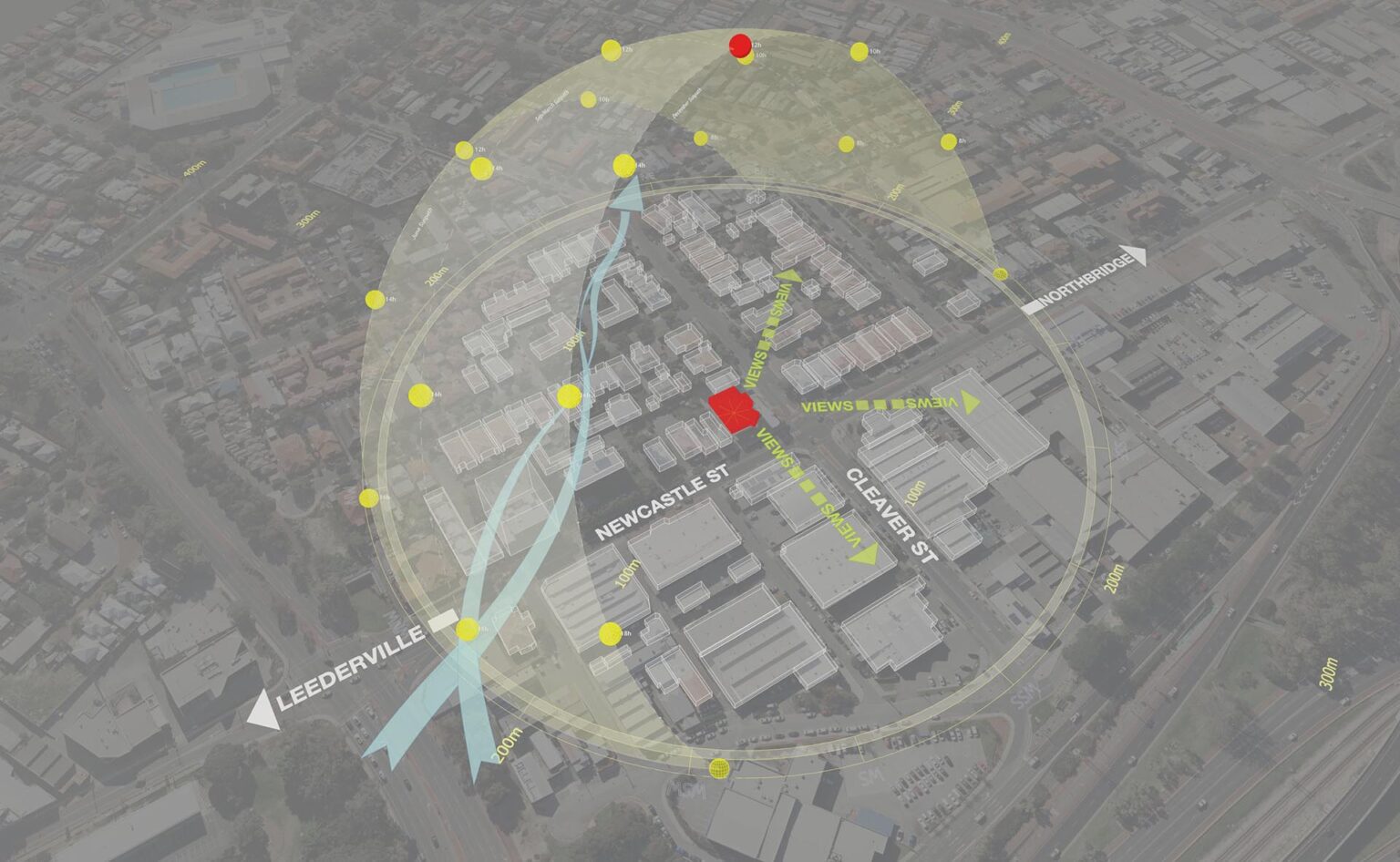
A successful architectural design must respond to its location. This sample project (Project 45) presents a Context Analysis Diagram, an essential resource for visualizing how your site sits within the broader urban fabric.
Unlike standard site plans that focus only on property lines, this 3D diagram captures the dynamic relationship between the project and its neighborhood—including street networks, neighboring massing, and environmental exposure.
Why Analyze the Urban Context?
Context analysis shifts the focus from “internal” to “external.” By modeling the surrounding environment, you can better understand:
Connectivity: How the site connects to major roads and pedestrian paths.
Urban Scale: The height and density of adjacent buildings.
Environmental Impact: How sun and wind interact with the urban canyon.
What This Sample Focuses On
This downloadable SketchUp file illustrates a clear workflow for analyzing mixed-use or urban projects:
1. Street Network & Connectivity
The diagram clearly identifies key access routes (e.g., Newcastle St, Cleaver St) using 3D text and directional flows. (Workflow Note: The flowing blue arrows indicating traffic movement were created using Dynamic Symbols, allowing for smooth, adjustable curves that sit perfectly on the terrain).
2. Solar Envelope & Exposure
Instead of a simple north arrow, this sample uses a 3D Solar Dome to visualize the sun’s path relative to the building mass. (Pro Tip: This semi-transparent sun dome was generated using the Sun Diagram plugin. It allows you to instantly see which parts of the site receive direct sunlight versus shadow).
3. Neighboring Massing
Simplified white block models represent the surrounding buildings, creating a high-contrast background that makes the active site analysis pop.
What’s Included in the Download?
A Prepared SketchUp File: Contains the full context massing and site setup.
Presentation-Ready Scene: Layered and styled for immediate export.
PDF Guide: A simple explanation of the diagram’s logic and structure.
How to Recreate This Style
To achieve the professional, diagrammatic look seen in Project 45, we recommend incorporating these tools into your workflow:
Sun Diagram: To create the yellow solar envelope and analyze sun angles accurately.
Dynamic Symbols: To draw the curved circulation arrows and place directional markers rapidly without manually modeling every line.
Get Started: Free versions of both Sun Diagram and Dynamic Symbols are available for download on the Extension Warehouse.
Download Sample Project Files
This sample project is available for free download. Use it to master the art of contextual analysis and elevate your architectural presentations.

About the Author
Nam Nguyen
Architect & Software Developer | Founder of Febhouse & ArchiDiagram
I build tools like Sun Diagram, Dynamic Symbols, and Shadow Slice to help architects work smarter.


