Context Analysis Diagram in SketchUp: Free Sample Project & Workflow
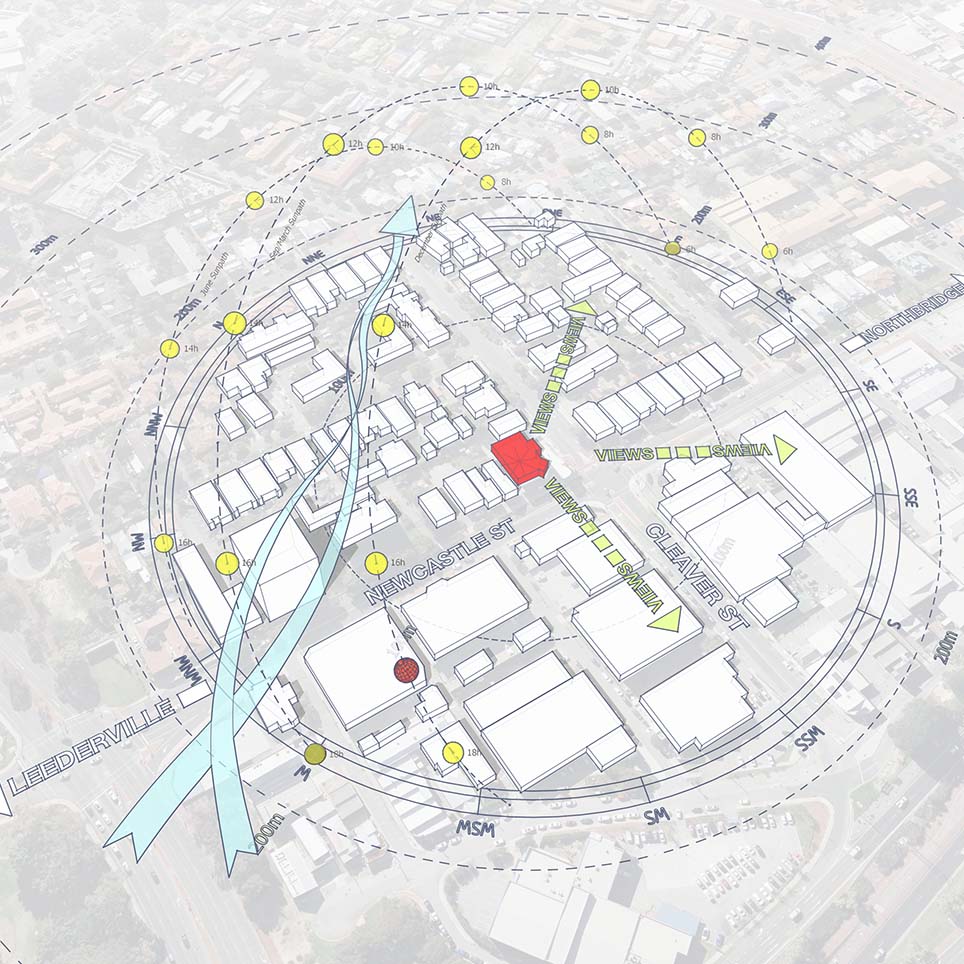
Understanding how a building relates to its surroundings is just as important as the building itself. This sample project (Project 41) introduces a comprehensive Context Analysis Diagram, specifically designed to help architects visualize external urban and environmental influences during the concept stage.
Unlike a standard site analysis that focuses on internal conditions, this context diagram zooms out to capture the broader urban fabric, traffic flow, and environmental forces shaping your site.

Watch the Workflow: Creating Architectural Diagrams
This post features a complete video walkthrough, “Create Architectural Diagrams – Updated Workflow (October 2025)”. Watch how we transform raw map data into a stylized, presentation-ready diagram that clearly communicates design intent.
What this sample focuses on
This downloadable SketchUp file demonstrates a clear workflow to analyze the “Big Picture” of your project site:
1. Urban Fabric & Boundaries
Visualize the relationship between your site and surrounding buildings, defining edges and urban density.
2. Environmental Context (Sun & Wind)
Understanding how the sun impacts the broader neighborhood is key. (Pro Tip: To accurately map solar influence and shadows on surrounding buildings, this workflow utilizes the Sun Diagram plugin for precise 3D sun paths).
3. Movement & Circulation
Analyze adjacent streets, access points, and traffic flow. (Workflow Note: To create the clean, curved traffic lines and directional markers seen in the sample, we recommend using Dynamic Symbols to keep your annotations consistent).
4. Visual Connections
Establish key view corridors and sightlines that dictate building orientation.
What’s included in this sample
A Prepared SketchUp Project File: Complete with the site model and surrounding context 3D.
Finished Context Diagram: Ready-to-render setup with organized tags.
Video Walkthrough: A step-by-step guide to the creation process.
This is a quick sample file, intended as a reference for diagram composition, scale contrast, and color hierarchy.
How to Recreate This Style
You can download this file to study the structure. To replicate the efficiency and style of this diagram in your own projects, consider using these essential tools:
Sun Diagram: For generating the environmental overlay and solar radius shown in the sample.
Dynamic Symbols: For placing the “movement” arrows and diagrammatic icons rapidly.
Did you know? The free versions of both Sun Diagram and Dynamic Symbols are available for immediate download on the Extension Warehouse.
Download Sample Project Files
This sample project is available for free download. Adopt this structure to improve your urban analysis for residential or commercial projects.

About the Author
Nam Nguyen
Architect & Software Developer | Founder of Febhouse & ArchiDiagram
I build tools like Sun Diagram, Dynamic Symbols, and Shadow Slice to help architects work smarter.